1. పరిచయం
Thank you for choosing the Garvee 88-Key Foldable Digital Piano. This manual provides essential information for the safe and efficient operation of your new instrument. Please read it thoroughly before use and retain it for future reference.

Figure 1: Garvee 88-Key Foldable Digital Piano
2 కీ ఫీచర్లు
- 88 స్పర్శ-సున్నితమైన కీలు: Simulates the feel of an acoustic piano for expressive play.
- ఫోల్డబుల్ డిజైన్: సులభమైన రవాణా మరియు నిల్వ కోసం తేలికైన మరియు పోర్టబుల్.
- Rich Tones & Demos: Features 128 tones and 20 demo songs for varied musical exploration.
- రికార్డింగ్ ఫంక్షన్: Allows users to record and play back their performances.
- MIDI & Bluetooth Connectivity: Connects wirelessly to external devices for apps and multimedia interaction.
- ద్వంద్వ విద్యుత్ సరఫరా: Operates via power adapter or batteries for versatile use.
- హెడ్ఫోన్ జాక్: Enables private practice without disturbing others.

Figure 2: Rich Functions Overview
3. సెటప్
3.1 Unfolding the Piano
- Place the piano on a flat, stable surface.
- Gently unfold the two halves of the keyboard until they lock into place. Ensure the hinge mechanism is fully extended and secure.

Figure 3: Space-Saving Foldable Design
3.2 పవర్ కనెక్షన్
The piano can be powered in two ways:
- ఎసి అడాప్టర్: Connect the provided power adapter to the DC IN port on the piano and then to a wall outlet.
- బ్యాటరీలు: For portable use, insert appropriate batteries into the battery compartment located on the underside of the piano.
3.3 మ్యూజిక్ రెస్ట్ను అటాచ్ చేయడం
Insert the music rest into the designated slots on the top panel of the piano. This provides a stable platform for sheet music or a tablet.

చిత్రం 4: చేర్చబడిన ఉపకరణాలు
4. ఆపరేషన్
4.1 కంట్రోల్ ప్యానెల్ ఓవర్view

Figure 5: Control Panel and Interfaces
| నం. | ఫంక్షన్ | వివరణ |
|---|---|---|
| 1 | LCD డిస్ప్లే | ప్రస్తుత సెట్టింగ్లు మరియు మోడ్లను చూపుతుంది. |
| 2 | నాబ్ | Adjusts various parameters like volume. |
| 3 | శక్తి | పియానోను ఆన్/ఆఫ్ చేస్తుంది. |
| 4 | ప్రదర్శన పాటలు | Plays built-in demo songs. |
| 5 | లయ | Selects different rhythm patterns. |
| 6 | మెట్రోనొమ్ | Activates the metronome for timing practice. |
| 7 | టోన్ | Selects different instrument tones. |
| 8 | Integrated Chord Buttons | Plays pre-programmed chords. |
| 9 | రికార్డ్/ప్లేబ్యాక్ | Records and plays back user performances. |
| 10 | హెడ్ఫోన్ జాక్ | Connects headphones for private listening. |
| 11 | ఆడియో ఇన్పుట్లు | బాహ్య ఆడియో మూలాలను కనెక్ట్ చేస్తుంది. |
| 12 | MIC ఇన్పుట్ | మైక్రోఫోన్ను కలుపుతుంది. |
| 13 | Sustain/Foot Pedal | Connects the sustain pedal. |
| 14 | Type-C communication | USB Type-C port for data communication. |
| 15 | ఛార్జింగ్ సూచిక | ఛార్జింగ్ స్థితిని సూచిస్తుంది. |
4.2 బ్లూటూత్ కనెక్టివిటీ
The Garvee Digital Piano supports both Audio Bluetooth and MIDI Bluetooth functions.
- ఆడియో బ్లూటూత్: Connect your smart device (phone, tablet) to the piano via Bluetooth to play along with your favorite songs through the piano's speakers.
- MIDI Bluetooth: Use MIDI Bluetooth to connect the piano to music apps on your computer or tablet for interactive learning and music creation.

Figure 6: Bluetooth & MIDI Functionality
4.3 హెడ్ఫోన్లను ఉపయోగించడం
Plug headphones into the Headphone Jack (10) for private practice. This mutes the internal speakers, allowing you to play without disturbing others.
5. నిర్వహణ
- శుభ్రపరచడం: Use a soft, dry cloth to wipe the surface of the piano. Do not use abrasive cleaners or solvents.
- నిల్వ: When not in use, fold the piano and store it in the provided carrying bag to protect it from dust and damage. Store in a cool, dry place away from direct sunlight and extreme temperatures.
- బ్యాటరీ సంరక్షణ: If using batteries, remove them if the piano will not be used for an extended period to prevent leakage.
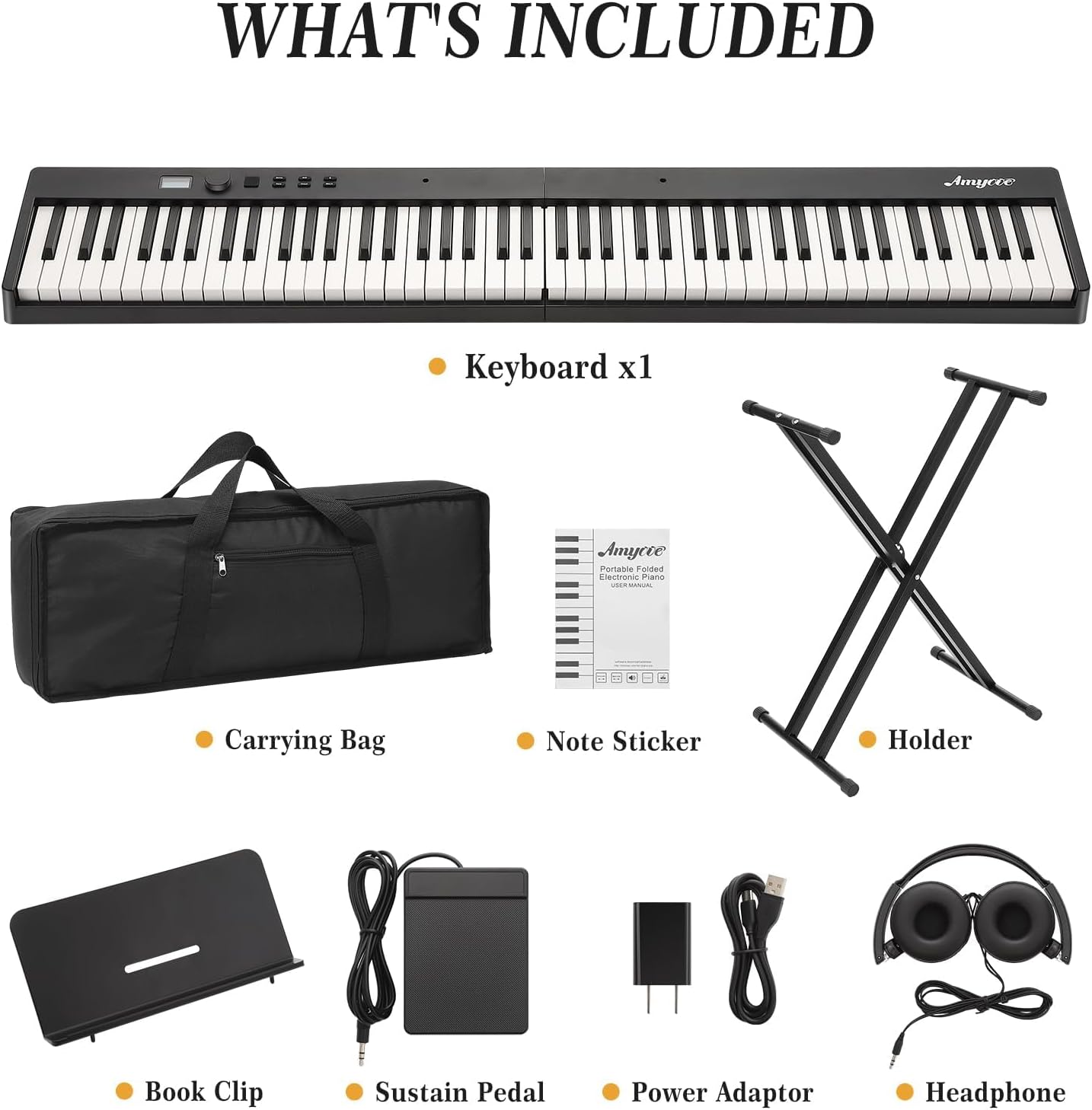
Figure 7: Portable Storage
6. ట్రబుల్షూటింగ్
| సమస్య | సాధ్యమైన కారణం | పరిష్కారం |
|---|---|---|
| శబ్దం లేదు | వాల్యూమ్ చాలా తక్కువగా ఉంది; హెడ్ఫోన్లు కనెక్ట్ అయ్యాయి; విద్యుత్ సమస్య. | Increase volume; disconnect headphones; check power connection/batteries. |
| కీలు స్పందించడం లేదు | Piano not powered on; faulty connection. | Ensure piano is powered on; check all connections. |
| బ్లూటూత్ కనెక్షన్ సమస్యలు | పరికరం జత చేసే మోడ్లో లేదు; జోక్యం. | Ensure both devices are in pairing mode; move closer to the piano; restart devices. |
| Piano not folding/unfolding smoothly | Obstruction in hinge; mechanism not aligned. | Check for debris; ensure proper alignment before applying force. |
7. స్పెసిఫికేషన్లు
| ఫీచర్ | వివరాలు |
|---|---|
| బ్రాండ్ | గర్వీ |
| మోడల్ సంఖ్య | nkSMDToM-TpkPUjdzxanMAPaNb3 |
| కీల సంఖ్య | 88 |
| కీ రకం | Touch-Sensitive, Semi-Weighted |
| ప్రత్యేక ఫీచర్ | ఫోల్డబుల్ |
| కొలతలు (విప్పబడినవి) | 38.19"డి x 14.96"వా x 7.09"హ |
| వస్తువు బరువు | 18.52 పౌండ్లు |
| శక్తి మూలం | AC అడాప్టర్, బ్యాటరీలు |
| కనెక్టివిటీ | Bluetooth (Audio & MIDI), USB Type-C, Headphone Jack, Audio In/Out, MIC In, Sustain Pedal |
| నైపుణ్యం స్థాయి | అనుభవశూన్యుడు |
| మొదటి తేదీ అందుబాటులో ఉంది | అక్టోబర్ 20, 2025 |
8. ఉత్పత్తి వీడియోలు
8.1 Ktaxon Foldable Digital Piano Display
This video demonstrates the features and functionality of the Ktaxon foldable digital piano, including its compact design and various operational modes. It provides a visual guide to the product's capabilities.
8.2 88 Key Digital Piano Overview
ఒక ఓవర్view వీడియో షోasing the 88-key digital piano, highlighting its design, key features, and sound quality. This video helps users understand the instrument's physical attributes and performance.
9. వారంటీ మరియు మద్దతు
For warranty information and customer support, please refer to the documentation included with your purchase or contact Garvee customer service directly. Specific warranty terms may vary by region and retailer.


