
పరిచయం
ధన్యవాదాలు, ధన్యవాదాలు.asing the ID-COOLING SE-904-XT BLACK CPU Air Cooler. This manual provides detailed instructions for installation, operation, and maintenance to ensure optimal performance and longevity of your product. Please read this manual thoroughly before installation and keep it for future reference.
భద్రతా సమాచారం
- Always disconnect power from your computer before installing or servicing any components.
- Handle the cooler and its components with care to avoid damage.
- పిల్లలకు దూరంగా ఉంచండి.
- సున్నితమైన భాగాలకు ఎలక్ట్రోస్టాటిక్ డిశ్చార్జ్ (ESD) నష్టాన్ని నివారించడానికి సరైన గ్రౌండింగ్ ఉండేలా చూసుకోండి.
- Do not attempt to modify the cooler or its components. Unauthorized modifications may void your warranty and pose safety risks.
ప్యాకేజీ విషయాలు
ఇన్స్టాలేషన్ ప్రారంభించే ముందు అన్ని భాగాలు ఉన్నాయని నిర్ధారించుకోండి:
- ID-COOLING SE-904-XT BLACK CPU Cooler (Heatsink and 120mm PWM Fan)
- Universal Mounting Brackets for Intel and AMD sockets
- బ్యాక్ప్లేట్
- మౌంటు స్క్రూలు మరియు స్పేసర్లు
- థర్మల్ పేస్ట్
- వినియోగదారు మాన్యువల్ (ఈ పత్రం)

Image: Universal Mounting Kits. This image displays the various brackets and hardware included for both Intel and AMD CPU sockets, along with a tube of thermal paste.
సెటప్ మరియు ఇన్స్టాలేషన్
The ID-COOLING SE-904-XT BLACK CPU Cooler features an easy assembly process with tool-free backplate and clamp-style mounting, supporting a wide range of Intel and AMD sockets including LGA1700 and AM5.
1. మదర్బోర్డ్ను సిద్ధం చేయండి
- Ensure your CPU is properly seated in its socket.
- Clean the CPU surface thoroughly with isopropyl alcohol to remove any old thermal paste or residue.
2. Install the Backplate
- Identify the correct backplate and mounting screws for your CPU socket (Intel or AMD).
- బ్యాక్ప్లేట్ను మదర్బోర్డ్ వెనుక వైపు ఉంచండి, రంధ్రాలను CPU సాకెట్ మౌంటు రంధ్రాలతో సమలేఖనం చేయండి.
- Insert the appropriate standoffs/screws through the motherboard from the front, securing them to the backplate.
3. థర్మల్ పేస్ట్ వేయండి
- Apply a small amount of thermal paste (pea-sized dot or thin line) to the center of the CPU's integrated heat spreader (IHS). Do not spread it manually; the pressure from the cooler will distribute it evenly.
4. హీట్సింక్ను మౌంట్ చేయండి
- Carefully place the heatsink onto the CPU, aligning the mounting holes on the heatsink base with the standoffs/screws on the motherboard.
- Secure the heatsink using the provided mounting clips or screws, tightening them gradually in a diagonal pattern until snug. Avoid overtightening.
5. Attach the Fan
- Attach the 120mm PWM fan to the heatsink using the included fan clips. Ensure the fan is oriented to blow air through the heatsink towards the rear or top of your PC case for optimal airflow.
- Connect the fan's 4-pin connector to the CPU_FAN header on your motherboard.

చిత్రం: ముందు భాగం view of the ID-COOLING SE-904-XT BLACK CPU Cooler, showing the fan and heatsink assembly.

Image: Diagram illustrating the compact design of the cooler, ensuring no interference with RAM slots on the motherboard.

Image: The ID-COOLING SE-904-XT BLACK CPU Cooler installed in a PC case, highlighting its compact 123mm dimension for compatibility with most tower cases.
ఆపరేటింగ్ సూచనలు
The ID-COOLING SE-904-XT BLACK CPU Cooler is designed for efficient and quiet operation. The 120mm PWM fan automatically adjusts its speed based on CPU temperature, providing optimal cooling performance while minimizing noise.
ఫ్యాన్ నియంత్రణ
The fan is a Pulse Width Modulation (PWM) controlled fan. Your motherboard's BIOS/UEFI settings or operating system software can be used to configure fan curves and monitor fan speed. Ensure the CPU_FAN header is set to PWM mode for proper control.
శీతలీకరణ పనితీరు
This cooler features a high heat dissipation design with large aluminum fins and 4 U-shaped heat pipes to efficiently dissipate heat. It is suitable for a wide range of CPUs, offering significant temperature improvements over stock cooling solutions.
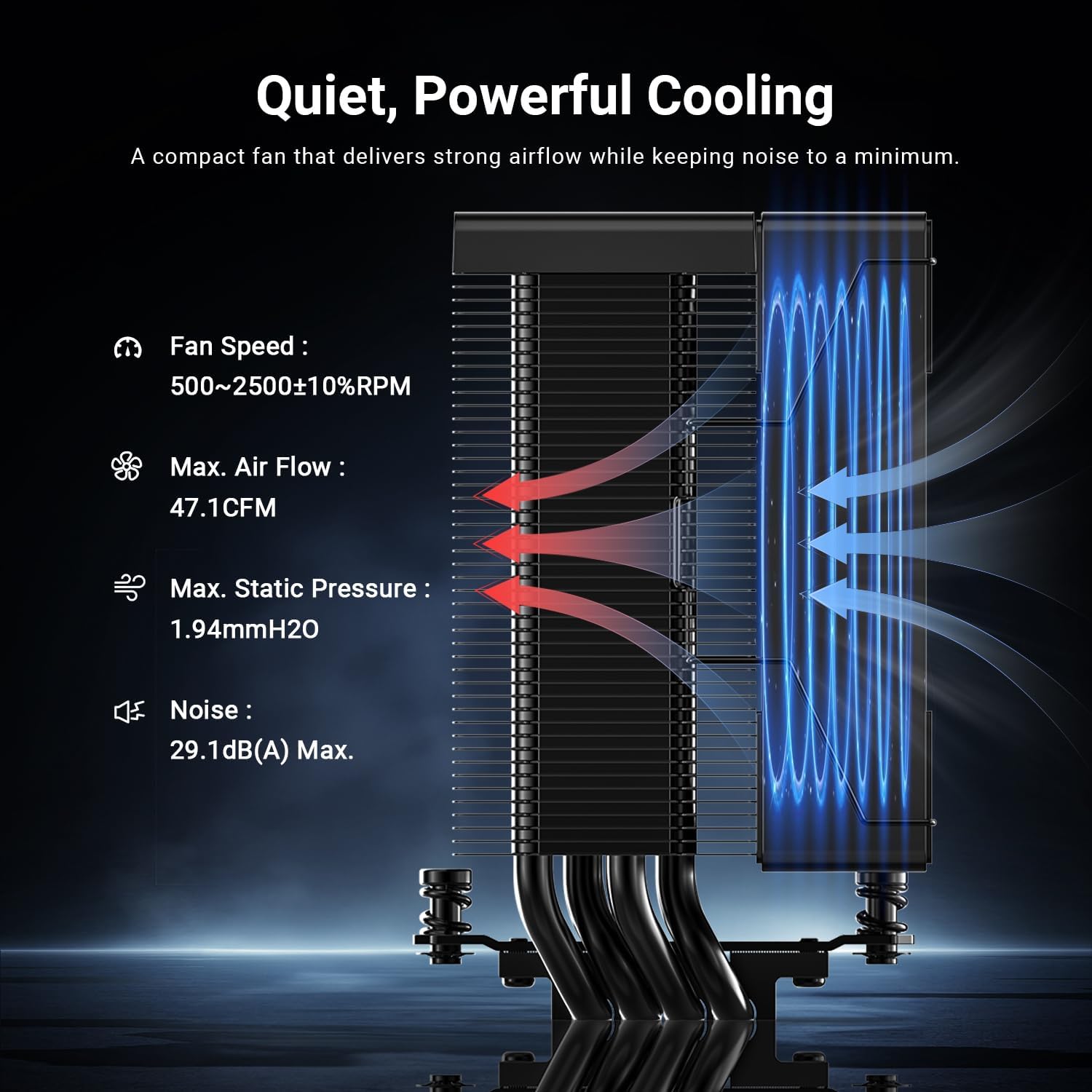
Image: Diagram detailing the cooling performance specifications, including Fan Speed (500-2500±10% RPM), Max. Air Flow (47.1 CFM), Max. Static Pressure (1.94mmH2O), and Noise (29.1dB(A) Max).

Image: The ID-COOLING SE-904-XT BLACK CPU Cooler shown installed within a computer system, demonstrating its compact fit.
నిర్వహణ
క్రమం తప్పకుండా నిర్వహణ మీ CPU కూలర్ యొక్క దీర్ఘాయువు మరియు సరైన పనితీరును నిర్ధారిస్తుంది.
Cleaning the Heatsink and Fan
- Periodically (every 3-6 months, or more frequently in dusty environments), disconnect power and open your PC case.
- Use compressed air to blow dust out of the heatsink fins and fan blades. Hold the fan blades gently to prevent them from spinning excessively during cleaning, which can damage the bearings.
- For stubborn dust, you may carefully remove the fan from the heatsink (if applicable) and clean it separately with a soft brush or cloth.
Thermal Paste Reapplication
- Thermal paste typically lasts for several years. However, if you notice significantly higher CPU temperatures or if you remove the cooler for any reason, it is recommended to reapply fresh thermal paste.
- To reapply, carefully remove the cooler, clean both the CPU IHS and the cooler's base thoroughly with isopropyl alcohol, and then apply new thermal paste as described in the 'Setup and Installation' section.
ట్రబుల్షూటింగ్
If you encounter issues with your ID-COOLING SE-904-XT BLACK CPU Cooler, refer to the following common problems and solutions:
Fan Not Spinning or Spinning Slowly
- పవర్ కనెక్షన్ని తనిఖీ చేయండి: Ensure the 4-pin fan connector is securely plugged into the CPU_FAN header on your motherboard.
- BIOS/UEFI సెట్టింగ్లు: Verify that the CPU_FAN header is enabled and configured correctly (e.g., set to PWM mode) in your motherboard's BIOS/UEFI.
- అడ్డంకులు: Check for any cables or debris obstructing the fan blades.
అధిక CPU ఉష్ణోగ్రతలు
- థర్మల్ పేస్ట్: Ensure thermal paste was applied correctly and is not dried out. Reapply if necessary.
- Mounting Pressure: Confirm the cooler is securely mounted and making good contact with the CPU. Uneven pressure can lead to poor heat transfer.
- గాలి ప్రవాహం: Check your PC case's overall airflow. Ensure intake and exhaust fans are properly oriented and not obstructed.
- డస్ట్ బిల్డప్: Clean the heatsink fins and fan blades as described in the 'Maintenance' section.
మితిమీరిన శబ్దం
- డస్ట్ బిల్డప్: Clean the fan blades and heatsink.
- ఫ్యాన్ బేరింగ్లు: If the fan makes a grinding or rattling noise, the bearings might be failing. Consider replacing the fan.
- ఫ్యాన్ కర్వ్: Adjust the fan speed curve in your motherboard's BIOS/UEFI to a quieter profile ఉష్ణోగ్రతలు అనుమతిస్తే.
స్పెసిఫికేషన్లు
| ఫీచర్ | స్పెసిఫికేషన్ |
|---|---|
| బ్రాండ్ | ID-శీతలీకరణ |
| మోడల్ సంఖ్య | SE-904-XT BLACK |
| కూలర్ రకం | Air Cooler (Tower Type) |
| వేడి పైపులు | 4 U-shaped Heat Pipes |
| ఫ్యాన్ పరిమాణం | 120mm PWM ఫ్యాన్ |
| ఫ్యాన్ వేగం | 500-2500 ±10% RPM |
| గరిష్టంగా గాలి ప్రవాహం | 47.1 CFM |
| గరిష్టంగా స్టాటిక్ ప్రెజర్ | 1.94 mmH2O |
| శబ్దం స్థాయి | 27.2 dB(A) Max |
| పవర్ కనెక్టర్ | X- పిన్ PWM |
| అనుకూలత | Intel: LGA1851/1700/1200/115X AMD: AM5/AM4 |
| Dimensions (Heatsink) | Compact, slim profile (e.g., 123mm width for case compatibility) |
| చేర్చబడిన భాగాలు | CPU Cooler, Mounting Kit, Thermal Paste, Manual |
| మూలం దేశం | చైనా |
వారంటీ మరియు మద్దతు
ID-COOLING products are manufactured to the highest quality standards. This product comes with a standard manufacturer's warranty against defects in materials and workmanship. Please refer to the official ID-COOLING website or your local distributor for specific warranty terms and conditions applicable to your region.
సాంకేతిక మద్దతు
For technical assistance, troubleshooting, or inquiries regarding your ID-COOLING SE-904-XT BLACK CPU Cooler, please visit the official ID-COOLING support webసైట్లో లేదా వారి కస్టమర్ సర్వీస్ విభాగాన్ని సంప్రదించండి. సంప్రదింపు సమాచారం సాధారణంగా ఉత్పత్తి ప్యాకేజింగ్ లేదా అధికారిక వెబ్సైట్లో చూడవచ్చు. webసైట్.
Webసైట్: www.idcooling.com