1. పరిచయం
Welcome to the FUNYET NY-03 16-inch Laptop user manual. This guide provides essential information for setting up, operating, maintaining, and troubleshooting your new laptop. Please read this manual thoroughly to ensure optimal performance and longevity of your device.
2. భద్రతా సమాచారం
మీ పరికరానికి నష్టం జరగకుండా లేదా మీకు మరియు ఇతరులకు గాయం కాకుండా ఉండటానికి, దయచేసి ఈ క్రింది భద్రతా జాగ్రత్తలను గమనించండి:
- ల్యాప్టాప్ను తీవ్రమైన ఉష్ణోగ్రతలు, ప్రత్యక్ష సూర్యకాంతి లేదా అధిక తేమకు గురిచేయవద్దు.
- ల్యాప్టాప్పై బరువైన వస్తువులను ఉంచడం మానుకోండి.
- Keep liquids away from the device. In case of spills, immediately power off and disconnect the charger.
- మీ ల్యాప్టాప్తో అందించిన అసలు పవర్ అడాప్టర్ను మాత్రమే ఉపయోగించండి.
- Do not attempt to disassemble or repair the laptop yourself. Contact qualified service personnel for assistance.
- వేడెక్కకుండా నిరోధించడానికి సరైన వెంటిలేషన్ ఉండేలా చూసుకోండి. గాలి వెంట్లను నిరోధించవద్దు.
3. ప్యాకేజీ విషయాలు
మీ ఉత్పత్తి ప్యాకేజీలో అన్ని అంశాలు ఉన్నాయని ధృవీకరించండి:
- FUNYET NY-03 16-inch Laptop
- పవర్ అడాప్టర్
- వినియోగదారు మాన్యువల్ (ఈ పత్రం)
4. ఉత్పత్తి ముగిసిందిview
Familiarize yourself with the physical features and components of your FUNYET NY-03 laptop.
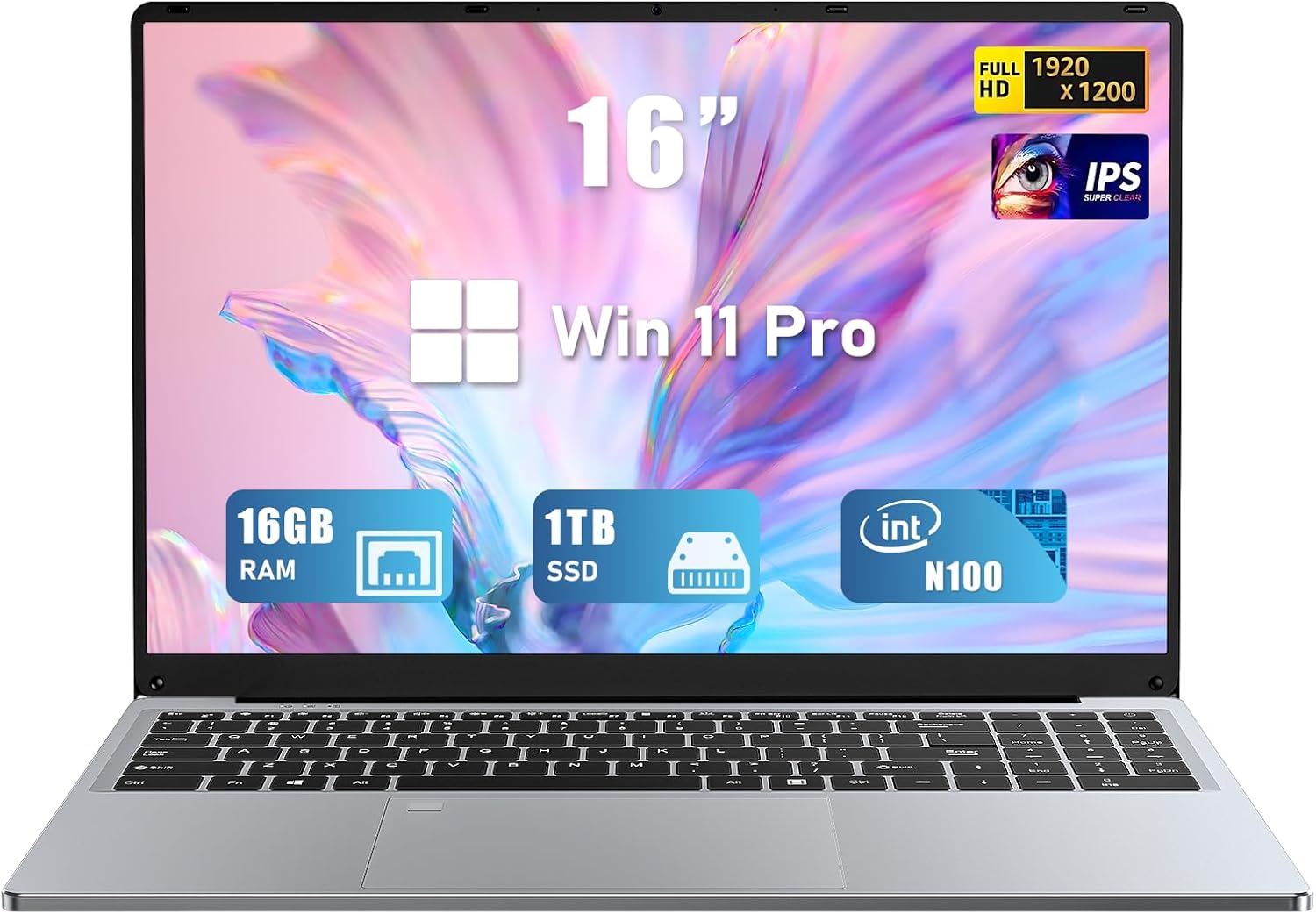
మూర్తి 4.1: ముందు view of the FUNYET NY-03 16-inch Laptop, showcasing దాని సొగసైన డిజైన్ మరియు పెద్ద డిస్ప్లే.
4.1. బాహ్య భాగాలు
- 16.0-అంగుళాల FHD IPS డిస్ప్లే: స్పష్టమైన దృశ్యాల కోసం అధిక రిజల్యూషన్ స్క్రీన్.
- బ్యాక్లిట్ కీబోర్డ్: Full-size keyboard with adjustable backlighting for comfortable typing in various lighting conditions.
- Large Touchpad: Responsive touchpad for precise navigation.
- ఇంటిగ్రేటెడ్ Webక్యామ్: Located above the display for video calls.
- వేలిముద్ర రీడర్: Integrated for secure and quick login.
4.2. పోర్ట్లు మరియు కనెక్టర్లు

మూర్తి 4.2: వైపు view of the FUNYET NY-03 laptop highlighting the various input/output ports.
- USB 3.0 పోర్ట్లు: హై-స్పీడ్ USB పరికరాలను కనెక్ట్ చేయడానికి.
- USB 2.0 పోర్ట్: ప్రామాణిక USB పరికరాలను కనెక్ట్ చేయడానికి.
- మినీ HDMI పోర్ట్: బాహ్య డిస్ప్లేలకు కనెక్ట్ చేయడానికి.
- DC పవర్ ఇన్పుట్: పవర్ అడాప్టర్ను కనెక్ట్ చేయడానికి.
- 3.5mm ఆడియో జాక్: హెడ్ఫోన్లు లేదా బాహ్య స్పీకర్లను కనెక్ట్ చేయడానికి.
4.3. ఉత్పత్తి వీడియోలు
వీడియో 4.1: ఒక ఓవర్view of the FUNYET 16-inch laptop, demonstrating its design and key features. This video provides a visual guide to the laptop's physical aspects and functionality.
Video 4.2: A detailed look at the FUNYET 16-inch gaming laptop, showcasing its various components and user experience. This video highlights the laptop's build quality and interface.
5. సెటప్
5.1. ప్రారంభ పవర్-ఆన్
- Connect the power adapter to the DC power input port on your laptop and then to a power outlet.
- ల్యాప్టాప్ను ఆన్ చేయడానికి కీబోర్డ్పై ఉన్న పవర్ బటన్ను నొక్కండి.
- Follow the on-screen instructions to complete the initial Windows 11 Pro setup, including language, region, and network settings.
5.2. నెట్వర్క్ కనెక్షన్
Wi-Fi నెట్వర్క్కి కనెక్ట్ చేయడానికి:
- టాస్క్బార్లోని Wi-Fi చిహ్నాన్ని క్లిక్ చేయండి.
- జాబితా నుండి మీకు కావలసిన నెట్వర్క్ను ఎంచుకోండి.
- ప్రాంప్ట్ చేయబడితే నెట్వర్క్ పాస్వర్డ్ను నమోదు చేసి, క్లిక్ చేయండి కనెక్ట్ చేయండి.
6. మీ ల్యాప్టాప్ను ఆపరేట్ చేయడం
6.1. ప్రాథమిక కార్యకలాపాలు
- పవర్ ఆన్/ఆఫ్: ఆన్ చేయడానికి పవర్ బటన్ను నొక్కండి. షట్ డౌన్ చేయడానికి, స్టార్ట్ బటన్ను క్లిక్ చేసి, ఆపై పవర్ > షట్ డౌన్ను క్లిక్ చేయండి.
- కీబోర్డ్: The backlit keyboard allows for comfortable typing. Use the Fn keys (e.g., Fn + F5/F6) to adjust backlight brightness.
- టచ్ప్యాడ్: నావిగేషన్ కోసం మల్టీ-టచ్ సంజ్ఞలకు మద్దతు ఇస్తుంది. అనుకూలీకరణ కోసం విండోస్ సెట్టింగ్లను చూడండి.
- వేలిముద్ర రీడర్: Set up your fingerprint for secure and fast login via Windows Hello in Settings > Accounts > Sign-in options.
6.2. డిస్ప్లే ఫీచర్లు

Figure 6.1: The 16-inch FHD IPS display with a 1920x1200 resolution, offering a vibrant and immersive viewing అనుభవం.
The 16.0-inch FHD IPS display provides a resolution of 1920x1200 pixels, ensuring sharp and vibrant visuals. The micro-bezel design enhances the immersive viewing అనుభవం.
6.3 ప్రదర్శన

Figure 6.2: Visual representation of the Intel 12th Gen N100 Processor, highlighting its 4 cores and 3.4 GHz turbo frequency for efficient performance.
Powered by an Intel 12th Gen N100 processor with 4 cores and 4 threads, operating up to 3.4 GHz, the laptop delivers seamless performance for daily tasks. With 16GB of RAM and a 1TB high-speed SSD, it efficiently handles multitasking and provides ample నిల్వ.
6.4 కనెక్టివిటీ
The laptop supports 802.11a/b/g/n/ac Wi-Fi for fast internet access and Bluetooth for connecting wireless peripherals.
6.5. బ్యాటరీ నిర్వహణ

Figure 6.3: Illustration of the laptop's long battery life, indicating up to 8 hours of usage on a single charge.
The laptop is equipped with a 6000mAH rechargeable battery, offering up to 8 hours of battery life. To maximize battery longevity, ensure the laptop is fully charged before first use and avoid frequent deep discharges.
6.6. Operating System: Windows 11 Pro
Your laptop comes pre-installed with Windows 11 Pro, offering enhanced security, productivity features, and a modern user interface. Explore features like Snap Layouts, Widgets, and Microsoft Teams integration for an optimized computing experience.
7. నిర్వహణ
- శుభ్రపరచడం: స్క్రీన్ మరియు బాహ్య భాగాన్ని శుభ్రం చేయడానికి మృదువైన, మెత్తటి బట్టను ఉపయోగించండి. రాపిడి క్లీనర్లు లేదా ద్రావకాలను నివారించండి.
- సాఫ్ట్వేర్ అప్డేట్లు: సిస్టమ్ స్థిరత్వం మరియు భద్రతను నిర్ధారించడానికి విండోస్ నవీకరణలను క్రమం తప్పకుండా తనిఖీ చేసి, ఇన్స్టాల్ చేయండి.
- నిల్వ: ఉపయోగంలో లేనప్పుడు ల్యాప్టాప్ను చల్లని, పొడి ప్రదేశంలో నిల్వ చేయండి.
8. ట్రబుల్షూటింగ్
ఈ విభాగం మీ ల్యాప్టాప్తో మీరు ఎదుర్కొనే సాధారణ సమస్యలను పరిష్కరిస్తుంది.
- ల్యాప్టాప్ పవర్ ఆన్ చేయదు: పవర్ అడాప్టర్ సురక్షితంగా కనెక్ట్ చేయబడిందని మరియు బ్యాటరీ ఛార్జ్ చేయబడిందని నిర్ధారించుకోండి. వేరే పవర్ అవుట్లెట్ను ప్రయత్నించండి.
- Wi-Fi కనెక్షన్ లేదు: విండోస్ సెట్టింగ్లలో Wi-Fi ప్రారంభించబడిందో లేదో తనిఖీ చేయండి. మీ రౌటర్ మరియు ల్యాప్టాప్ను పునఃప్రారంభించండి.
- నెమ్మది పనితీరు: Close unnecessary applications, check for malware, and ensure sufficient free space on the SSD.
- Screen issues: Adjust display brightness. If the screen remains blank or distorted, try connecting to an external monitor via Mini HDMI to diagnose.
9. స్పెసిఫికేషన్లు
| ఫీచర్ | స్పెసిఫికేషన్ |
|---|---|
| బ్రాండ్ | FUNYET |
| మోడల్ పేరు | ఎన్వై 03 |
| స్క్రీన్ పరిమాణం | 16 అంగుళాలు |
| స్క్రీన్ రిజల్యూషన్ | 1920 x 1200 పిక్సెల్స్ (FHD IPS) |
| ప్రాసెసర్ | Intel 12th Gen N100 (up to 3.4GHz) |
| RAM | 16GB DDR4 |
| నిల్వ | 1TB SSD |
| ఆపరేటింగ్ సిస్టమ్ | Windows 11 ప్రో |
| గ్రాఫిక్స్ కార్డ్ | ఇంటిగ్రేటెడ్ (ఇంటెల్ UHD గ్రాఫిక్స్) |
| వైర్లెస్ రకం | 802.11a/b/g/n/ac, బ్లూటూత్ |
| ఓడరేవులు | 1x USB 3.0, 1x USB 2.0, 1x Mini HDMI, 1x DC Power Input, 1x 3.5mm Audio Jack |
| ప్రత్యేక లక్షణాలు | బ్యాక్లిట్ కీబోర్డ్, ఫింగర్ప్రింట్ రీడర్ |
| బ్యాటరీ | 6000mAH (up to 8 hours) |
| వస్తువు బరువు | 5.1 పౌండ్లు |
| ఉత్పత్తి కొలతలు | 14 x 9 x 0.8 అంగుళాలు |
10. వారంటీ మరియు మద్దతు
Your FUNYET NY-03 laptop comes with a 1 సంవత్సరాల వారంటీ. For any issues or queries, please contact FUNYET customer support. They aim to reply within 24 hours.
- కస్టమర్ సేవ: Enjoy worry-free usage with dedicated round-the-clock customer service.
- సంప్రదింపు సమాచారం: Refer to the contact details provided in your product packaging or on the official FUNYET webమద్దతు కోసం సైట్.


