1. పరిచయం
This manual provides detailed instructions for the installation, operation, and maintenance of your DEWENWILS 300W Wi-Fi Low Voltage Transformer. This device is designed to convert 120V AC household current to 12V or 14V AC low voltage, suitable for landscape lighting systems. It features three independent control zones, Wi-Fi connectivity for app and voice control, and various timer functions.
2. భద్రతా సమాచారం
- విద్యుత్ భద్రత: Always disconnect power before installing or servicing the transformer. Installation should be performed by a qualified electrician or in accordance with local electrical codes.
- వాల్యూమ్tagఇ అనుకూలత: ఇన్పుట్ వాల్యూమ్ని నిర్ధారించుకోండిtage matches your power supply (120V AC).
- లోడ్ సామర్థ్యం: Do not exceed the maximum 300W output capacity of the transformer. Overloading can cause damage and pose a fire hazard.
- ఓవర్లోడ్ రక్షణ: The transformer is equipped with over-current and overload protection. If the current threshold is exceeded, the unit will automatically cut power to prevent damage.
- నీటి బహిర్గతం: While the unit is designed for indoor/outdoor use and is waterproof, ensure all connections are secure and protected from direct water spray or submersion.
- గ్రౌండింగ్: Ensure the transformer is properly grounded according to local electrical codes.
3. ప్యాకేజీ విషయాలు
- DEWENWILS 300W Wi-Fi Low Voltage Transformer (Model: HSLT05A)
4. ఉత్పత్తి ముగిసిందిview
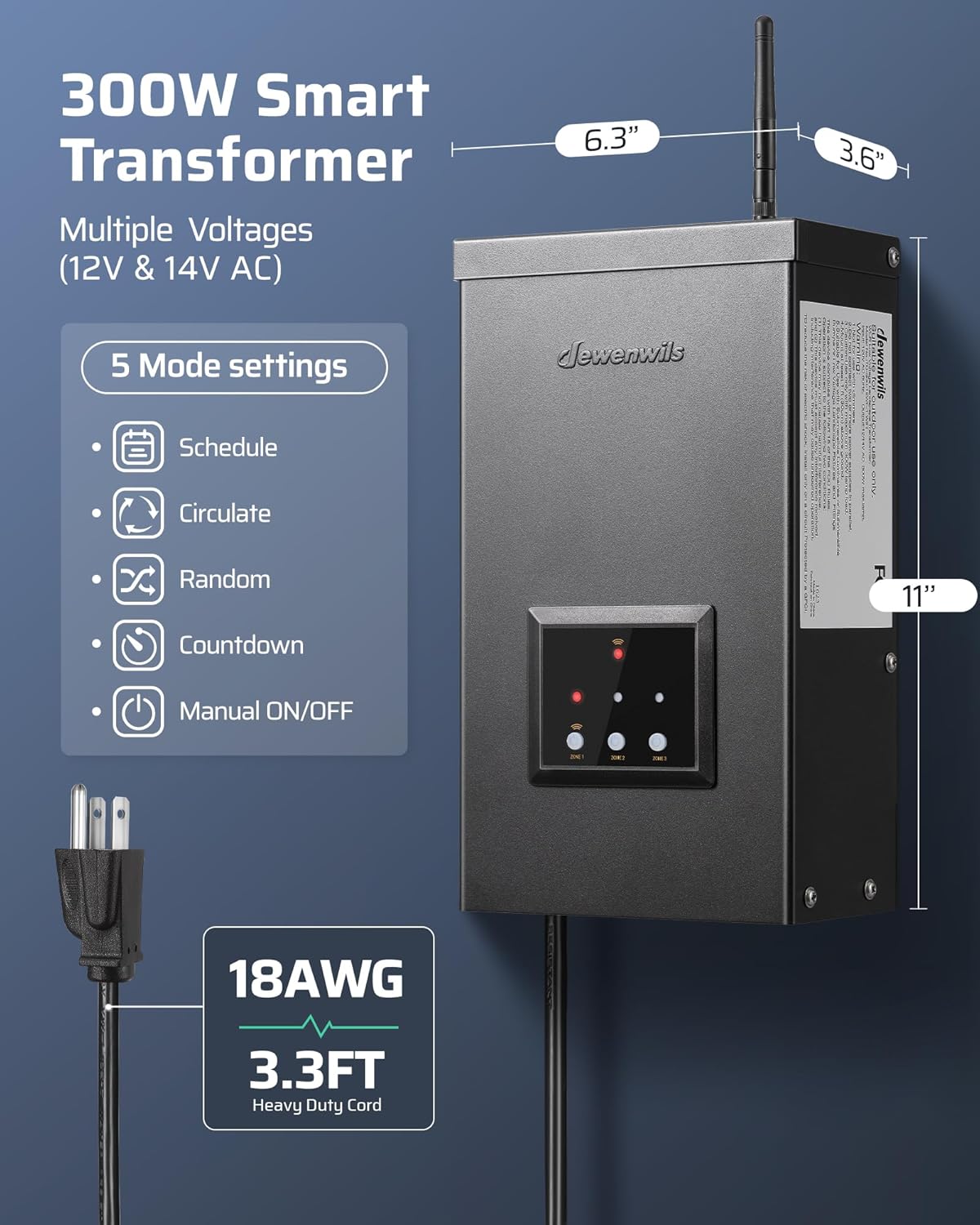
The DEWENWILS 300W Wi-Fi Low Voltage Transformer is housed in a durable, weatherproof metal casing. It features a control panel with indicator lights and buttons for manual operation and zone selection. An external antenna is provided for Wi-Fi connectivity.

5. సంస్థాపన
5.1 మౌంటు
- Select a suitable location for wall mounting. The transformer is designed for both indoor (e.g., garages) and outdoor (e.g., patios, gardens) installation.
- Ensure the location allows for proper ventilation and access to the power outlet and wiring terminals.
- Securely mount the transformer to a sturdy surface using appropriate hardware.
5.2 వైరింగ్
The transformer features three independent output zones, allowing for separate control of different landscape lighting systems. Each zone can be set to either 12V AC or 14V AC output.

- Before Wiring: Ensure the transformer is unplugged from the power source.
- Connect Landscape Lights: Connect your low voltage landscape lighting wires to the appropriate terminals for each zone (COM, 12V, or 14V).
- వాల్యూమ్tagఇ ఎంపిక: Use the 'Zone' button on the control panel or the app to select between 12V AC and 14V AC output for each zone. 12V is suitable for closer halogen installations, while 14V is recommended for LED fixtures or longer wire runs.
- వైర్ నాణ్యత: The transformer is designed for use with high-quality, waterproof wire, typically 100% pure copper for optimal conductivity and reduced heat.


5.3 పవర్ కనెక్షన్
Once wiring is complete, plug the transformer into a standard 120V AC grounded outlet.
6. App Setup & Wi-Fi Connection
The DEWENWILS transformer can be controlled wirelessly via the DEWENWILS App or Smart Life App.
6.1 యాప్ డౌన్లోడ్ మరియు ఇన్స్టాలేషన్
- Download the "DEWENWILS App" or "Smart Life App" from your smartphone's app store (iOS or Android).
- మీ ఖాతాకు నమోదు చేయండి లేదా లాగిన్ అవ్వండి.
6.2 Wi-Fi Pairing
- ముఖ్యమైన: It is recommended to pair the device to your Wi-Fi network before permanent installation and wiring. Bring the transformer close to your Wi-Fi router for initial setup.
- Ensure your Wi-Fi network is 2.4GHz మాత్రమే. The transformer does not support 5GHz networks.
- In the app, press the "+" button to add a new device. The app should auto-pair the Wi-Fi landscape transformer. Follow the on-screen instructions to complete the connection.
- Once connected, you can configure settings and control the transformer from anywhere.
6.3 వాయిస్ కంట్రోల్ ఇంటిగ్రేషన్
The transformer is compatible with Alexa and Google Assistant for voice commands.
- Link your DEWENWILS or Smart Life account with your Alexa or Google Home app.
- Follow the instructions within the Alexa or Google Home app to discover and control your landscape lighting.


7. ఆపరేటింగ్ సూచనలు
7.1 మాన్యువల్ నియంత్రణ
The control panel on the transformer allows for basic manual operation:
- Zone Buttons: Press the 'Zone' button to cycle through and select the desired output voltage (12V/14V AC) for each of the three independent zones.
- మాన్యువల్ ఆన్/ఆఫ్: Use the dedicated buttons on the control panel for immediate manual control of the lighting.
7.2 App Control and Timer Functions
The DEWENWILS App provides comprehensive control and scheduling options:
- స్వతంత్ర జోన్ నియంత్రణ: Control each of the three zones separately, allowing for customized lighting schedules and settings for different areas of your landscape.
- షెడ్యూల్ మోడ్: Set specific ON/OFF times for your lights. You can set individual schedules for each zone and repeat them weekly.
- Circulate Mode: Program your landscape lights to turn ON/OFF repeatedly during a set period.
- యాదృచ్ఛిక మోడ్: This mode switches outdoor landscape lights ON and OFF randomly, which can be used to simulate occupancy when you are away.
- కౌంట్డౌన్ మోడ్: Set a countdown timer for the lights to turn ON or OFF after a specified duration.
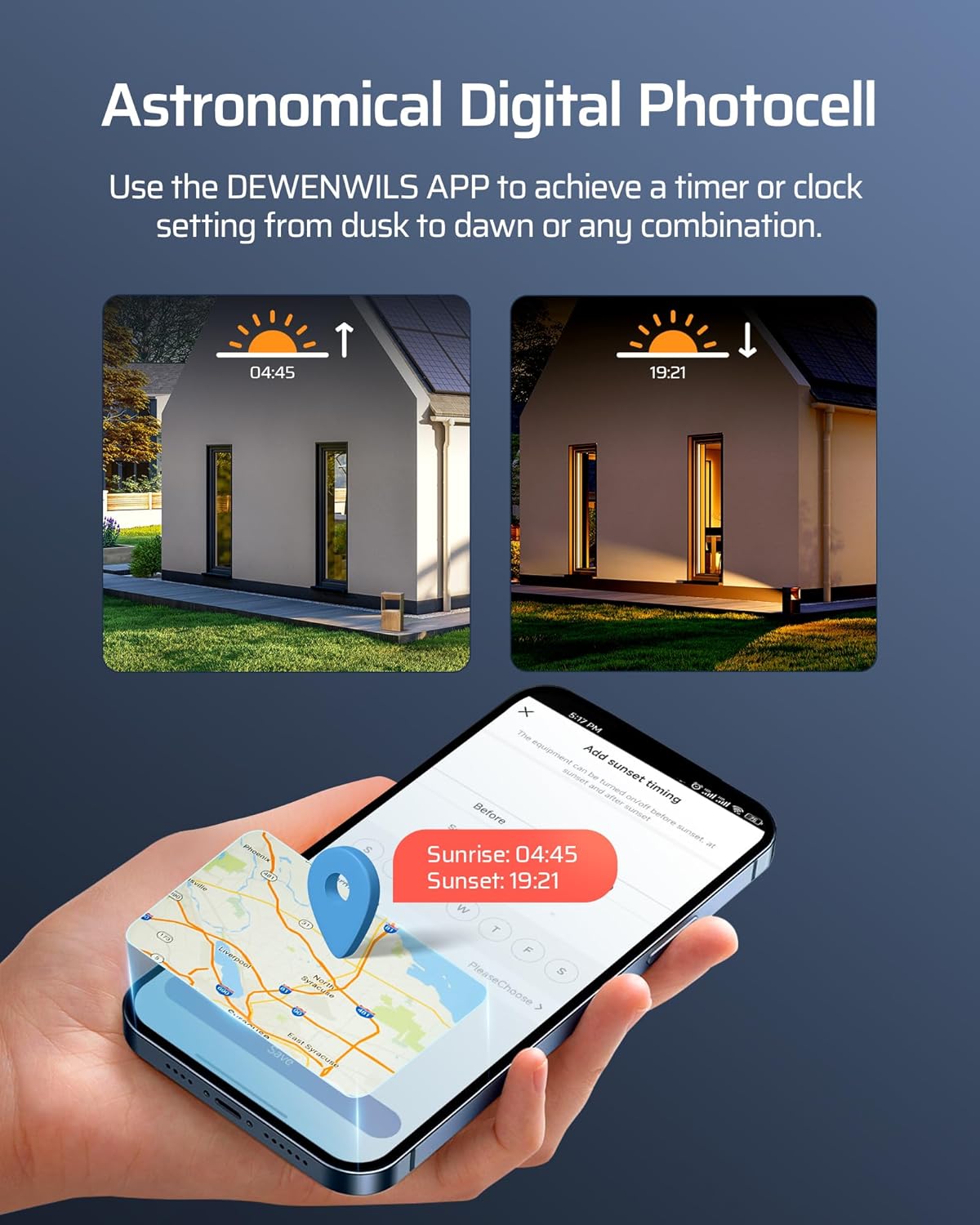
- Astronomical Mode: Utilize the app's astronomical timing function to automatically turn lights ON at dusk and OFF at dawn based on your geographical location.


7.3 మెమరీ ఫంక్షన్
The transformer includes a memory function. In the event of a power or internet outage, your selected settings and modes are stored on a cloud server, ensuring no data loss and automatic restoration once power/internet is re-established.
7.4 Power Statistics
The DEWENWILS App allows you to view electricity consumption statistics for your landscape lighting system, helping you monitor energy usage.

8. నిర్వహణ
- శుభ్రపరచడం: Periodically clean the exterior of the transformer with a soft, damp గుడ్డ. రాపిడి క్లీనర్లు లేదా ద్రావకాలు ఉపయోగించవద్దు.
- కనెక్షన్ తనిఖీ: Regularly inspect all wiring connections to ensure they are secure and free from corrosion.
- యాంటెన్నా సంరక్షణ: The Wi-Fi antenna is removable. If removing for installation, ensure it is reattached securely. Handle with care to prevent damage.
- వాతావరణ రక్షణ: Although weatherproof, ensure the unit is not submerged in water and that its enclosure remains sealed.

9. ట్రబుల్షూటింగ్
| సమస్య | సాధ్యమైన కారణం | పరిష్కారం |
|---|---|---|
| Transformer not powering on. | No power to the outlet; faulty power cord; internal issue. | Check the power outlet with another device. Inspect the power cord for damage. If issues persist, contact support. |
| లైట్లు వెలగడం లేదు. | Loose wiring connections; incorrect voltage selection; overload protection activated; faulty lights. | Check all wiring connections. Verify correct 12V/14V output selection for the zone. Reduce load if overload protection is active. Test lights individually. |
| Wi-Fi connection fails or disconnects. | Incorrect Wi-Fi band (5GHz); weak Wi-Fi signal; incorrect password; network changes. | Ensure your router is broadcasting a 2.4GHz Wi-Fi signal. Move the transformer closer to the router during setup. Double-check Wi-Fi password. If network name changed, you may need to reset the transformer and re-pair. |
| Overload protection frequently activates. | మొత్తం వాట్tage of connected lights exceeds 300W. | మొత్తం వాట్ను లెక్కించండిtage of your landscape lights. Ensure it does not exceed 300W. Reduce the number of lights or use lower wattagఇ బల్బులు. |
10. స్పెసిఫికేషన్లు
- మోడల్ సంఖ్య: HSLT05A
- ఇన్పుట్ వాల్యూమ్tage: 120V AC
- అవుట్పుట్ వాల్యూమ్tage: 12V AC / 14V AC (selectable per zone)
- గరిష్ట శక్తి అవుట్పుట్: 300W
- మండలాల సంఖ్య: 3 Independent Outputs
- Wi-Fi ఫ్రీక్వెన్సీ: 2.4GHz (5GHzకి అనుకూలంగా లేదు)
- అనుకూలత: DEWENWILS App, Smart Life App, Alexa, Google Assistant
- మెటీరియల్: All-metal, weatherproof housing (SPCC Steel)
- రక్షణ: Over-current, Overload, Short Circuit Protection
- ధృవపత్రాలు: FCC Listed, ETL Listed
- మౌంటు రకం: వాల్ మౌంట్
- శక్తి మూలం: AC
- ప్రస్తుత రేటింగ్: 3 Amps
- ప్యాకేజీ కొలతలు: 15.16 x 9.25 x 6.54 అంగుళాలు
- వస్తువు బరువు: 12.99 పౌండ్లు


11. వారంటీ మరియు మద్దతు
For warranty information and technical support, please contact DEWENWILS customer service. Details can typically be found on the product packaging or the official DEWENWILS webసైట్.
తయారీదారు: DEWENWILS


