
LTC OM021 Wired Gaming Mouse User Guide
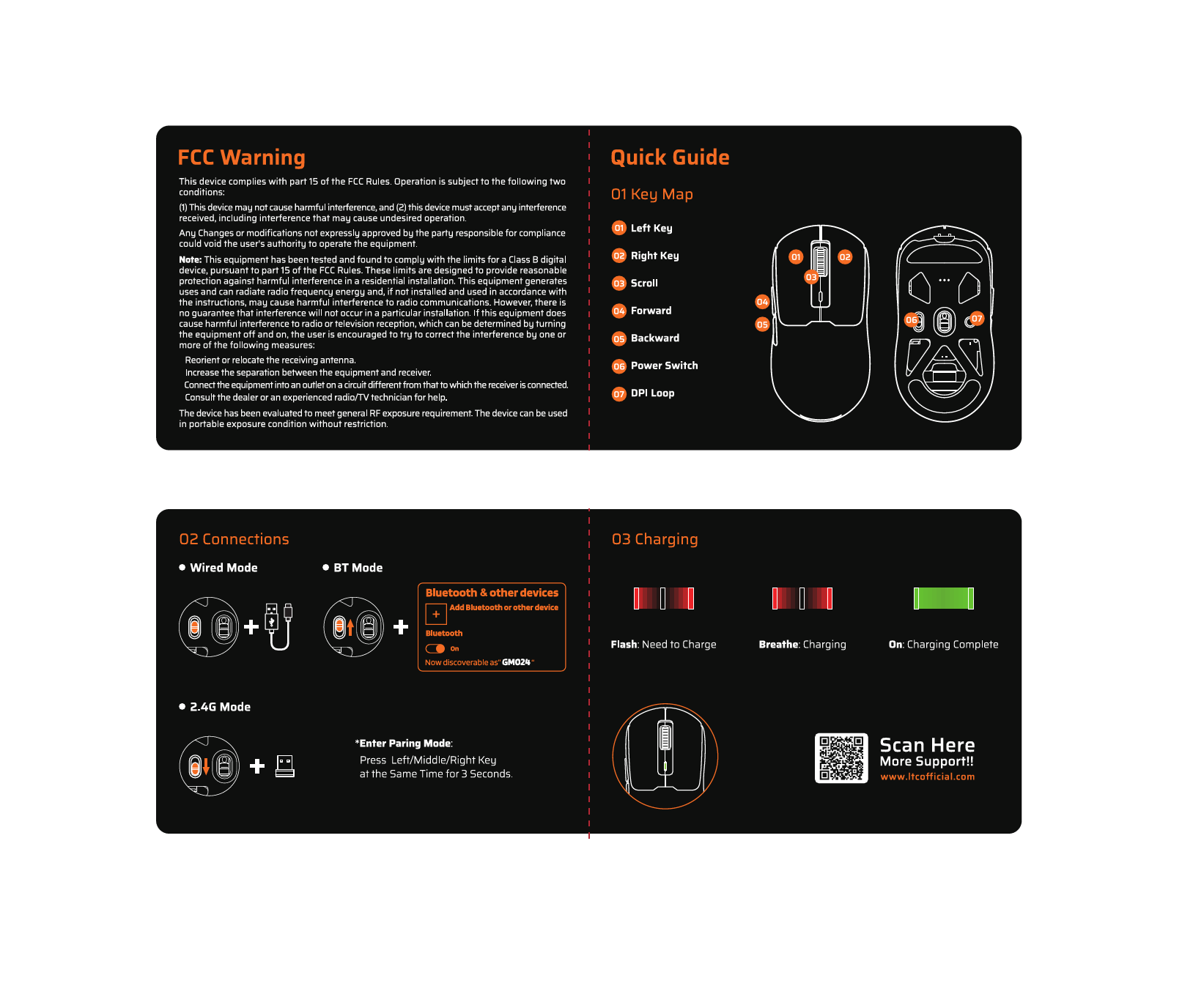
LTC OM021 Wired Gaming Mouse Quick Guide Key Map Left Button Right Button Scroll Wheel Press And Hold For Six Seconds To Download Software Click To Adjust DPI Press And…


LTC allows for a diverse range of consumer electronics, specializing in gaming peripherals like mechanical keyboards and mice, alongside home audio and cooling appliances.
LTC is a versatile consumer electronics brand known for delivering affordable and functional technology solutions. The brand operates prominently in the gaming sector, offering enthusiast-grade peripherals such as the Nimbleback series of mechanical keyboards and precision wireless mice. These products often feature tri-mode connectivity (Bluetooth, 2.4G, Wired), hot-swappable switches, and customizable RGB lighting tailored for gamers.
In addition to gaming gear, LTC manufactures home electronics including floor fans, portable cooling devices, and audio equipment like public address amplifiers and waterproof speakers. Whether facilitating a high-performance gaming setup or improving home comfort, LTC products are designed for ease of use and reliability.
నుండి తాజా మాన్యువల్లు manuals+ ఈ బ్రాండ్ కోసం రూపొందించబడింది.




ఈ బ్రాండ్ కోసం సెటప్, ఇన్స్టాలేషన్ మరియు ట్రబుల్షూటింగ్ వీడియోలను చూడండి.
ఈ బ్రాండ్ కోసం మాన్యువల్లు, రిజిస్ట్రేషన్ మరియు మద్దతు గురించి సాధారణ ప్రశ్నలు.
To enter pairing mode on many LTC mice, press and hold the designated mode button, or hold the Left, Middle, and Right buttons simultaneously for about 3 seconds until the LED flashes rapidly.
Drivers and configuration software for LTC gaming keyboards and mice can typically be found on the official website at ltcofficial.com.
Attach the base to the vertical riser using the included screws. Place the motor on the arm, secure the rear grille cover with the locking nut, attach the propeller blade, and finally snap the front grille frame onto the rear frame.
Yes, digital display models like the LXWT114 typically feature a programmable timer (e.g., up to 12 hours) accessible via the control panel or remote.