1. పరిచయం
Thank you for choosing the LTC 3-Channel 60W Public Address Amplifier with USB/SD-MP3. This manual provides essential information for the safe and efficient operation of your new amplifier. Please read it thoroughly before use and keep it for future reference. This amplifier is designed for public address applications, offering versatile input options including microphones, auxiliary devices, and integrated USB/SD card playback.
2. భద్రతా సూచనలు
సురక్షితమైన ఆపరేషన్ను నిర్ధారించడానికి మరియు నష్టాన్ని నివారించడానికి, దయచేసి ఈ క్రింది భద్రతా జాగ్రత్తలను గమనించండి:
- శక్తి మూలం: కనెక్ట్ చేయండి amplifier only to the specified power sources (12V DC or 220V AC) as indicated on the unit. Ensure the voltagఇ మీ స్థానిక విద్యుత్ సరఫరాతో సరిపోలుతుంది.
- వెంటిలేషన్: వెంటిలేషన్ ఓపెనింగ్లను నిరోధించవద్దు. వేడెక్కకుండా నిరోధించడానికి యూనిట్ చుట్టూ తగినంత గాలి ప్రవాహాన్ని నిర్ధారించుకోండి.
- తేమ: బహిర్గతం చేయవద్దు amplifier to rain, moisture, or excessive humidity. Keep it away from liquids.
- శుభ్రపరచడం: Disconnect the power before cleaning. Use a dry, soft cloth. Do not use liquid cleaners or aerosols.
- సర్వీసింగ్: ఈ ఉత్పత్తిని మీరే సర్వీసింగ్ చేయడానికి ప్రయత్నించవద్దు. అన్ని సర్వీసింగ్లను అర్హత కలిగిన సర్వీస్ సిబ్బందికి సూచించండి. యూనిట్ తెరవడం వలన మీరు ప్రమాదకరమైన వాల్యూమ్లకు గురవుతారు.tages లేదా ఇతర ప్రమాదాలు.
- ప్లేస్మెంట్: ఉంచండి amplifier on a stable, flat surface. Avoid placing it near heat sources or in direct sunlight.
- ఓవర్లోడ్: ఓవర్లోడ్ చేయవద్దు amplifier. Ensure connected speakers match the amplifier's impedance and power ratings.
3. ఉత్పత్తి ముగిసిందిview
The LTC 3-Channel 60W Public Address Amplifier is a versatile audio solution designed for various PA applications. It features multiple input options and an integrated MP3 player for convenience.
3.1 ఫ్రంట్ ప్యానెల్ నియంత్రణలు మరియు కనెక్షన్లు
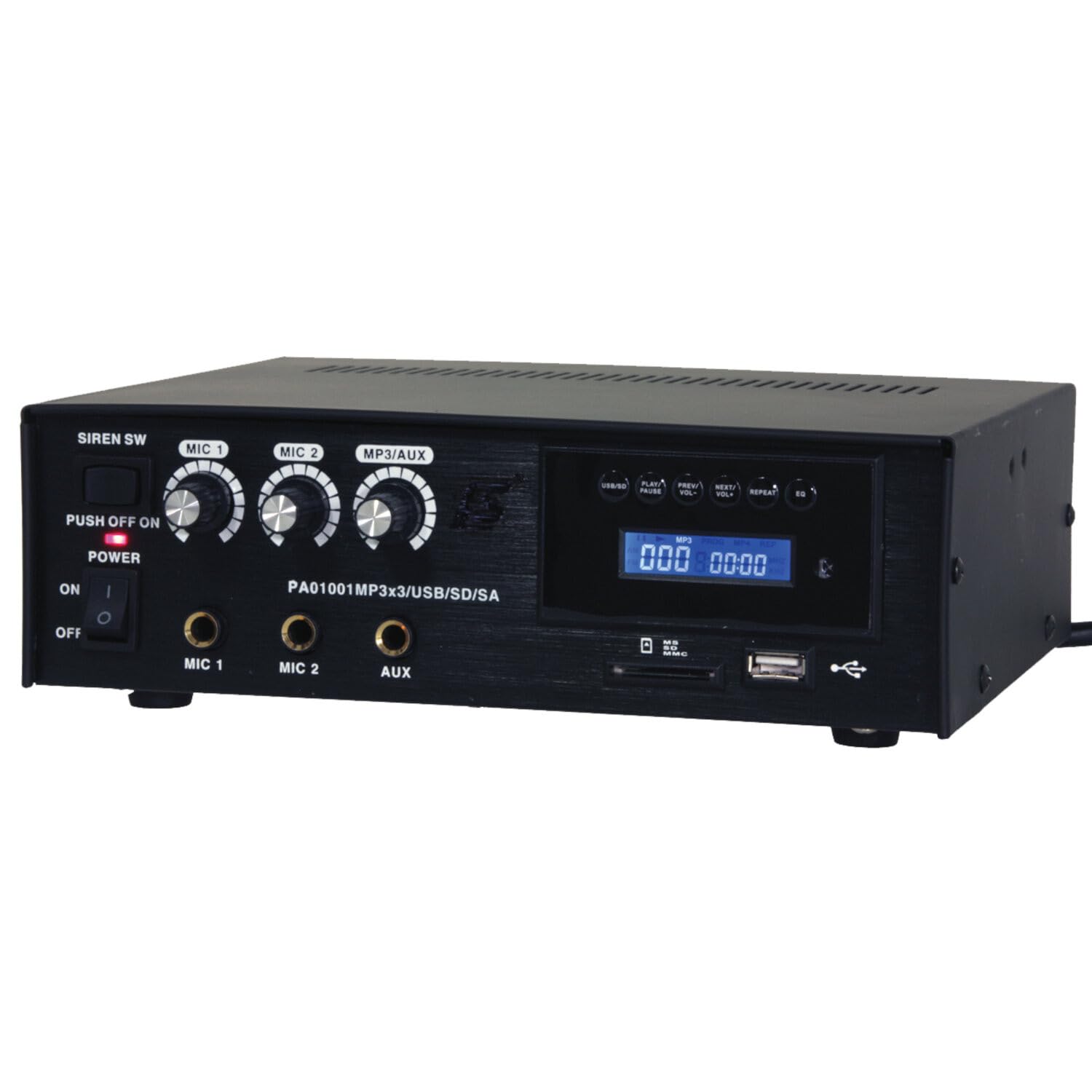
Image: Front panel of the LTC 3-Channel 60W Public Address Amplifier. Visible controls include volume knobs for MIC1, MIC2, and MP3/AUX, a Master volume knob, a Power switch, a Siren switch, and input jacks for MIC1, MIC2, and AUX. The MP3 player section features a display, USB port, and SD card slot.
- SIREN SW: Switch to activate the built-in siren sound.
- PUSH OFF / ON / OF Power Switch: ప్రధాన పవర్ స్విచ్ కోసం ampజీవితకాలం.
- MIC 1 Volume: Rotary knob to adjust the volume level for Microphone Input 1.
- MIC 2 Volume: Rotary knob to adjust the volume level for Microphone Input 2.
- MP3/AUX Volume: Rotary knob to adjust the volume level for the MP3 player and Auxiliary input.
- MASTER Volume: Rotary knob to control the overall output volume of the ampజీవితకాలం.
- MIC 1 ఇన్పుట్: 6.3mm jack for connecting Microphone 1.
- MIC 2 ఇన్పుట్: 6.3mm jack for connecting Microphone 2.
- AUX ఇన్పుట్: 6.3mm jack for connecting external audio sources (e.g., CD player, smartphone).
- USB/SD MP3 Player: Integrated player with USB port and SD card slot for direct playback of audio files. Includes control buttons (Play/Pause, Prev/Vol-, Next/Vol+, Repeat, EQ) and an LCD display.
3.2 ముఖ్య లక్షణాలు
- Mobile or fixed amplifier with 12V battery (car, boat) or 220V mains power supply.
- Integrated MP3 player with USB and SD ports for music playback.
- Includes a siren for powerful sound and an MP3 control screen with a blue LCD display.
4. సెటప్
మీ సెటప్ చేయడానికి ఈ దశలను అనుసరించండి ampజీవితకాలం:
4.1 పవర్ కనెక్షన్
- For 220V AC Operation: Connect the supplied power cord to the AC input on the rear panel of the amplifier and then to a standard 220V AC wall outlet.
- 12V DC ఆపరేషన్ కోసం: Connect a 12V DC power source (e.g., car battery) to the 12V DC input terminals on the rear panel. Ensure correct polarity (+ to + and - to -).
- నిర్ధారించండి amplifier's power switch is in the 'OFF' position before connecting to power.
4.2 స్పీకర్ కనెక్షన్
- Locate the speaker output terminals on the rear panel of the ampజీవితకాలం.
- Connect your speakers to these terminals, ensuring correct polarity (positive to positive, negative to negative).
- Verify that the total impedance of the connected speakers is compatible with the amplifier's output specifications to prevent damage.
4.3 ఆడియో ఇన్పుట్ కనెక్షన్
- మైక్రోఫోన్లు: Insert your microphones into the MIC 1 and/or MIC 2 input jacks on the front panel.
- సహాయక పరికరాలు: Connect external audio sources (e.g., smartphone, laptop, CD player) to the AUX input jack on the front panel using an appropriate 6.3mm audio cable.
- USB/SD మీడియా: Insert a USB flash drive into the USB port or an SD card into the SD card slot on the front panel for MP3 playback.
5. ఆపరేటింగ్ సూచనలు
ఒకసారి ది ampలైఫైయర్ సెటప్ చేయబడిన తర్వాత, ఆపరేషన్ కోసం ఈ దశలను అనుసరించండి:
5.1 పవర్ చేయడం ఆన్/ఆఫ్
- అన్ని కనెక్షన్లు సురక్షితంగా ఉన్నాయని నిర్ధారించుకోండి.
- Turn the MASTER volume knob to its minimum position.
- Flip the POWER switch to the 'ON' position. The power indicator light will illuminate.
- To power off, turn the MASTER volume to minimum and then flip the POWER switch to 'OFF'.
5.2 మైక్రోఫోన్ వాడకం
- Connect your microphone(s) to the MIC 1 and/or MIC 2 inputs.
- Slowly increase the MIC 1 and/or MIC 2 volume knob(s) to the desired level.
- Adjust the MASTER volume for overall output.
- Avoid pointing microphones directly at speakers to prevent feedback (howling).
5.3 AUX Input Usage
- Connect your external audio device to the AUX input.
- Ensure the volume on your external device is set to a moderate level.
- Slowly increase the MP3/AUX volume knob to the desired level.
- Adjust the MASTER volume for overall output.
5.4 MP3/USB/SD Playback
- Insert a USB flash drive into the USB port or an SD card into the SD card slot. The amplifier will automatically detect the media and begin playback.
- Use the 'PLAY/PAUSE' button to start or pause playback.
- Use the 'PREV/VOL-' button to go to the previous track or press and hold to decrease volume.
- Use the 'NEXT/VOL+' button to go to the next track or press and hold to increase volume.
- రిపీట్ మోడ్ల ద్వారా సైకిల్ చేయడానికి 'REPEAT' బటన్ను ఉపయోగించండి (ఉదా., ఒకటి పునరావృతం చేయండి, అన్నీ పునరావృతం చేయండి).
- Use the 'EQ' button to cycle through equalizer presets.
- Adjust the MP3/AUX volume knob and MASTER volume for desired output.
5.5 Siren Function
- To activate the siren, flip the SIREN SW to the 'ON' position.
- To deactivate, flip the SIREN SW back to the 'OFF' position.
- Use the MASTER volume to control the siren's output level.
6. నిర్వహణ
Proper maintenance ensures the longevity of your ampజీవితకాలం:
- శుభ్రపరచడం: Regularly wipe the unit with a soft, dry cloth. Do not use abrasive cleaners, waxes, or solvents.
- వెంటిలేషన్: Ensure that the ventilation grilles are free from dust and debris. Use a soft brush or vacuum cleaner to clear them if necessary.
- నిల్వ: నిల్వ చేస్తే ampలైఫైయర్ను ఎక్కువసేపు ఉంచి, విద్యుత్తు నుండి డిస్కనెక్ట్ చేసి, ప్రత్యక్ష సూర్యకాంతి మరియు తీవ్రమైన ఉష్ణోగ్రతలకు దూరంగా చల్లని, పొడి ప్రదేశంలో నిల్వ చేయండి.
- కనెక్షన్లు: Periodically check all cable connections for tightness and signs of wear.
7. ట్రబుల్షూటింగ్
మీరు మీతో సమస్యలను ఎదుర్కొంటే amplifier, refer to the table below for common problems and solutions:
| సమస్య | సాధ్యమైన కారణం | పరిష్కారం |
|---|---|---|
| శక్తి లేదు | Power cable not connected; Power outlet faulty; Power switch off; 12V DC battery depleted or incorrectly connected. | Check power cable connection; Try a different outlet; Ensure power switch is ON; Check 12V DC battery charge and polarity. |
| సౌండ్ అవుట్పుట్ లేదు | Master volume too low; Input volume too low; Speakers not connected or faulty; Incorrect input selected (for MP3/AUX); Mute activated. | Increase Master and input volumes; Check speaker connections and functionality; Ensure correct input source is active; Check if any mute function is engaged. |
| వక్రీకరించిన ధ్వని | Volume too high (clipping); Speaker impedance mismatch; Faulty cables or connections. | Reduce volume; Verify speaker impedance compatibility; Check and replace faulty cables. |
| MP3/USB/SD not playing | సరికాదు file format; USB drive/SD card faulty or not inserted correctly; MP3/AUX volume too low. | నిర్ధారించండి files are MP3 format; Reinsert USB/SD card; Try a different USB/SD card; Increase MP3/AUX volume. |
| Feedback (howling) from microphones | Microphone too close to speakers; Microphone volume too high. | Reposition microphones away from speakers; Reduce microphone volume. |
ఈ పరిష్కారాలను ప్రయత్నించిన తర్వాత కూడా సమస్య కొనసాగితే, దయచేసి కస్టమర్ మద్దతును సంప్రదించండి.
8. స్పెసిఫికేషన్లు
Technical specifications for the LTC 3-Channel 60W Public Address Ampజీవితకాలం:
| ఫీచర్ | స్పెసిఫికేషన్ |
|---|---|
| మోడల్ సంఖ్య | LTCAUDIO95-1000 |
| Output Power (12V) | RMS 35W, Max. 45W |
| Output Power (220V) | RMS 45W, Max. 60W |
| ఛానెల్ల సంఖ్య | 3 (MIC1, MIC2, AUX/MP3) |
| వాల్యూమ్tage | 220 వోల్ట్లు (AC), 12 వోల్ట్లు (DC) |
| గరిష్ట సరఫరా వాల్యూమ్tage | 240 వోల్ట్లు |
| కనిష్ట సరఫరా వాల్యూమ్tage | 220 వోల్ట్లు (AC) |
| ఉత్పత్తి కొలతలు (L x W x H) | 48 x 9 x 35 సెం.మీ (18.9 x 3.5 x 13.8 అంగుళాలు) |
| ఉత్పత్తి బరువు | 3.26 కిలోగ్రాములు (7.19 పౌండ్లు) |
| మౌంటు రకం | టేబుల్ మౌంట్ |
| ఇంటిగ్రేటెడ్ ఫీచర్లు | USB/SD MP3 Player, Siren |
9. వారంటీ మరియు మద్దతు
This product is manufactured by Ibiza and sold under the LTC brand. Spare parts availability is indicated for 2 years from the date of purchase. For technical support, troubleshooting assistance beyond what is provided in this manual, or warranty claims, please contact your retailer or the authorized service center. Keep your proof of purchase for warranty validation.


