1. పరిచయం
This manual provides detailed instructions for the PWAYTEK DT257W-H Wireless HDMI Transmitter and Receiver Kit. This device allows for wireless transmission of HDMI video and audio signals, supporting up to 4K input resolution and 1080P output resolution over distances up to 1313 feet (400 meters). Please read this manual thoroughly before use to ensure proper setup and operation.
ప్యాకేజీ విషయాలు
మీ ప్యాకేజీలో అన్ని అంశాలు ఉన్నాయని ధృవీకరించండి:
- వైర్లెస్ HDMI ట్రాన్స్మిటర్ *1
- వైర్లెస్ HDMI రిసీవర్ *1
- USB-A to Type-C Cable *2
- Mini HDMI to HDMI Adapter *1
- Micro HDMI to HDMI Adapter *1
- వినియోగదారు మాన్యువల్ *1

2. ఉత్పత్తి ముగిసిందిview
The PWAYTEK DT257W-H kit consists of a wireless HDMI transmitter (TX) and a wireless HDMI receiver (RX). These devices are designed to extend video and audio signals wirelessly, eliminating the need for long HDMI cables. They support 2.4GHz and 5GHz dual-band connectivity for stable transmission.

కీ ఫీచర్లు
- వైర్లెస్ కనెక్టివిటీ: Transmits 1080P HD video and audio signals wirelessly.
- లాంగ్-రేంజ్ ట్రాన్స్మిషన్: Up to 1313 feet (400 meters) line-of-sight.
- ప్లగ్ మరియు ప్లే: Simple setup without complex software installation.
- True Wireless Transmitter: The transmitter can operate without an external power cord when connected to laptops manufactured after 2022 that provide sufficient power via USB-C.
- బహుముఖ అనుకూలత: Works with various devices including laptops, game consoles, Blu-ray players, cameras, and more. Supports up to 4K input and 1080P output.
- మెరుగైన సిగ్నల్: Utilizes WiFi 6 technology for improved speed and stability.

3. సెటప్ సూచనలు
Follow these steps to set up your PWAYTEK Wireless HDMI Kit:
Step 1: Install the Receiver (RX)
- Connect the HDMI port of the receiver (RX) to the HDMI input port of your display device (TV, monitor, projector).
- Use one of the provided USB-A to Type-C cables to connect the receiver to a USB port on the display device for power. If the display device does not have a USB port, use a 5V/1A USB power adapter (not included).
- Once powered, the display should show a blue connection status screen.
Step 2: Install the Transmitter (TX)
- Connect the HDMI port of the transmitter (TX) to the HDMI output port of your signal source device (laptop, PC, set-top box, camera). Use the appropriate Mini HDMI or Micro HDMI adapter if necessary.
- Use the second provided USB-A to Type-C cable to connect the transmitter to a USB port on the signal source device for power. Ensure the current and voltage provided are greater than 5V/1A. For laptops manufactured after 2022, the transmitter may operate without an external power cord if the laptop's USB-C port provides sufficient power.
Step 3: Display Status
- The receiver indicator light will be continuously on.
- The transmitter (TX) indicator light will change from flashing to steady ON.
- Allow approximately 2 seconds for the connection to complete and the signal to appear on your display.

4. ఆపరేటింగ్ సూచనలు
Once connected, the PWAYTEK Wireless HDMI Kit will automatically mirror or extend your display, depending on your source device's settings. The system supports both Extend Mode and Mirror Mode.
Extend Mode vs. Mirror Mode
- మిర్రర్ మోడ్: The external display shows the exact same content as your source device's screen.
- పొడిగింపు మోడ్: The external display acts as an extension of your source device's screen, allowing you to have different content on each display.
You can switch between these modes through your operating system's display settings (e.g., Windows Display Settings, macOS System Preferences).

పరికర అనుకూలత
The PWAYTEK DT257W-H is compatible with a wide range of devices:
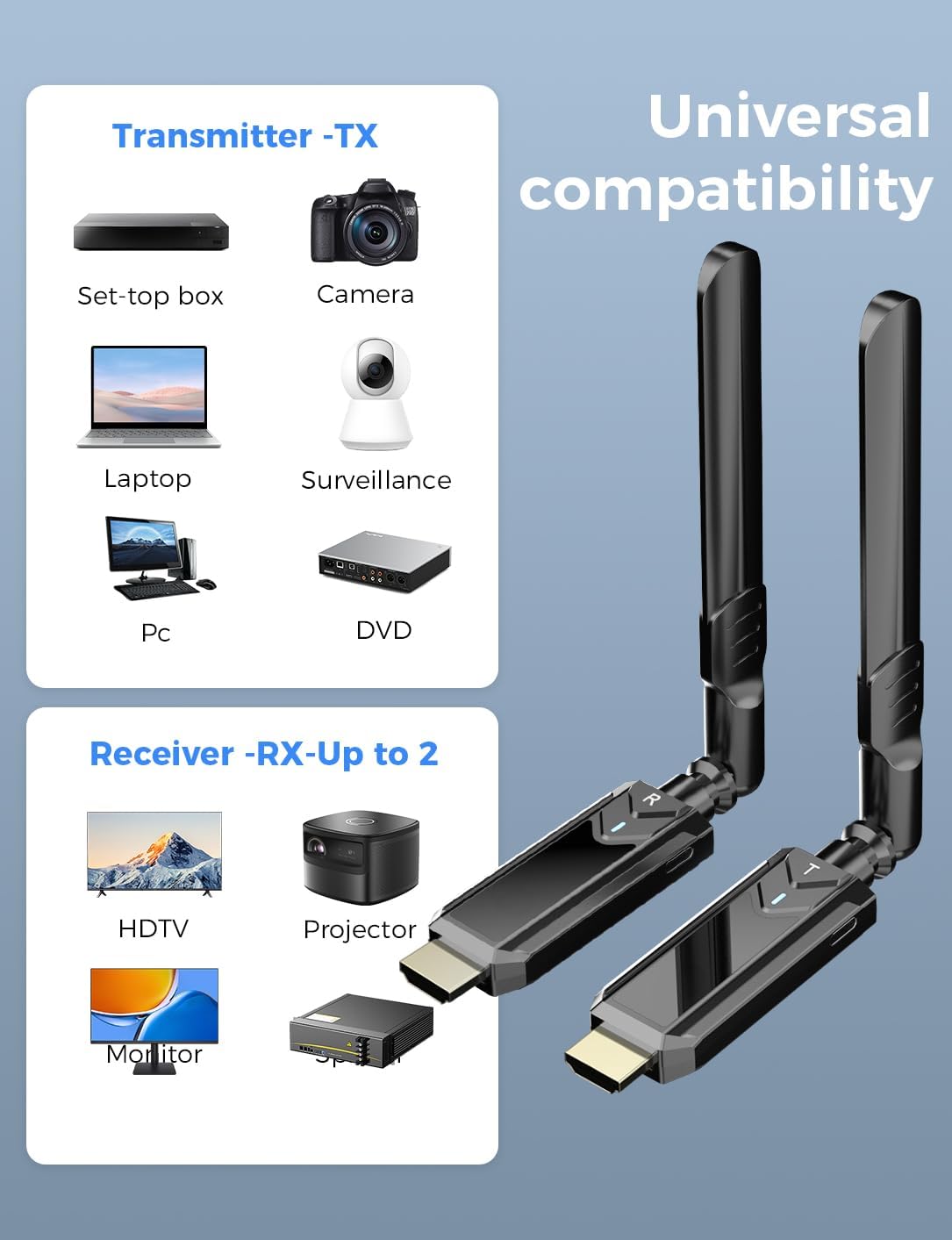
- Transmitter (TX) Sources: Set-top boxes, Cameras, Laptops, PCs, Surveillance systems, DVD players.
- Receiver (RX) Displays: HDTVs, Projectors, Monitors, Splitters.
5. ప్రసార పనితీరు
The PWAYTEK DT257W-H offers robust wireless transmission capabilities:
- దీర్గ పరిధి: Up to 1313 feet (400 meters) in an open outdoor environment.
- తక్కువ జాప్యం: Less than 50ms, suitable for real-time video streaming.
- మెరుగైన సిగ్నల్: Features WiFi 6 technology for faster data rates (up to 9.6Gbps) and improved stability compared to WiFi 5.
- ద్వంద్వ బ్యాండ్: Supports both 2.4GHz and 5GHz frequencies for optimal performance and interference avoidance.
Note: Transmission distance and speed may be affected when the product passes through walls or encounters other obstacles. Performance will vary based on environmental conditions.


6. నిర్వహణ
To ensure the longevity and optimal performance of your PWAYTEK Wireless HDMI Kit, follow these maintenance guidelines:
- శుభ్రపరచడం: Use a soft, dry cloth to clean the devices. Avoid using liquid cleaners or abrasive materials.
- నిల్వ: పరికరాలను ప్రత్యక్ష సూర్యకాంతి మరియు తీవ్రమైన ఉష్ణోగ్రతలకు దూరంగా చల్లని, పొడి ప్రదేశంలో నిల్వ చేయండి.
- నిర్వహణ: Handle the units with care. Avoid dropping them or subjecting them to strong impacts.
- కనెక్టివిటీ: Ensure HDMI and USB-C cables are connected securely but without excessive force.
7. ట్రబుల్షూటింగ్
If you encounter issues with your PWAYTEK Wireless HDMI Kit, refer to the following troubleshooting steps:
డిస్ప్లేలో సిగ్నల్ లేదు
- కనెక్షన్లను తనిఖీ చేయండి: Ensure both the transmitter (TX) and receiver (RX) are securely connected to their respective HDMI ports and are receiving power via the USB-C cables.
- శక్తి మూలం: Verify that the USB power source for both units provides at least 5V/1A. If using a laptop for TX power, ensure it's a newer model (post-2022) or use an external 5V/1A adapter.
- సూచిక లైట్లు: Check the indicator lights on both units. The RX light should be solid ON, and the TX light should change from flashing to solid ON after a few seconds. If lights are off or flashing incorrectly, recheck power.
- HDMI Adapters: If using Mini or Micro HDMI adapters, ensure they are correctly seated and functional.
- డిస్ప్లే ఇన్పుట్: Confirm your display device (TV/monitor) is set to the correct HDMI input channel.
- పరికరాలను పునఃప్రారంభించండి: Disconnect and reconnect both the transmitter and receiver, then restart your source device and display.
Intermittent Signal or Poor Quality
- Reduce Obstacles: Walls, furniture, and other electronic devices can interfere with the wireless signal. Try to minimize obstacles between the transmitter and receiver.
- దూరం: Ensure the distance between the TX and RX units is within the recommended range for your environment (e.g., less than 65ft/20m with one wall).
- జోక్యం: Other wireless devices (Wi-Fi routers, cordless phones) operating on 2.4GHz or 5GHz bands can cause interference. Try to move the units away from such devices or change the Wi-Fi channel on your router if possible.
- యాంటెన్నా స్థానం: Adjust the antennas on both units for optimal signal reception.
Transmitter Not Powering On Wirelessly (Laptop)
- The 'True Wireless' feature for the transmitter is primarily for laptops manufactured after 2022 that can supply sufficient power (5V/1A or more) via their USB-C port. If your laptop is older or does not provide enough power, you must use the provided USB-A to Type-C cable to connect the transmitter to a dedicated 5V/1A USB power adapter.
8. స్పెసిఫికేషన్లు
| ఫీచర్ | స్పెసిఫికేషన్ |
|---|---|
| మోడల్ సంఖ్య | DT257W-H |
| బ్రాండ్ | PWAYTEK |
| ప్రసార దూరం | 1313 అడుగుల (400 మీటర్లు) లైన్-ఆఫ్-సైట్ వరకు |
| ఇన్పుట్ రిజల్యూషన్ | 4K వరకు |
| అవుట్పుట్ రిజల్యూషన్ | 1080P@60Hz |
| జాప్యం | < 50మి.సి |
| వైర్లెస్ స్టాండర్డ్ | IEEE 802.11n (WiFi 6 enhanced) |
| ఫ్రీక్వెన్సీ బ్యాండ్ | 2.4GHz & 5GHz Dual Band |
| పవర్ ఇన్పుట్ | 5V/1A (via USB-C) |
| వస్తువు బరువు | 5.6 ఔన్సులు (0.16 కిలోగ్రాములు) |
| ప్యాకేజీ కొలతలు | 6.26 x 5.67 x 0.94 అంగుళాలు |
| ప్రత్యేక లక్షణాలు | స్క్రీన్ మిర్రరింగ్ |
| అనుకూల పరికరాలు | Camera, Laptop, Monitor, Projector, TV |
9. వారంటీ సమాచారం
For warranty details, please refer to the warranty card included with your product or contact the retailer/manufacturer directly. Warranty terms typically cover manufacturing defects for a specified period from the date of purchase.
10. మద్దతు
If you require further assistance or have questions not covered in this manual, please contact PWAYTEK customer support through their official website or the retailer where you purchased the product. Have your model number (DT257W-H) and purchase information ready when contacting support.


